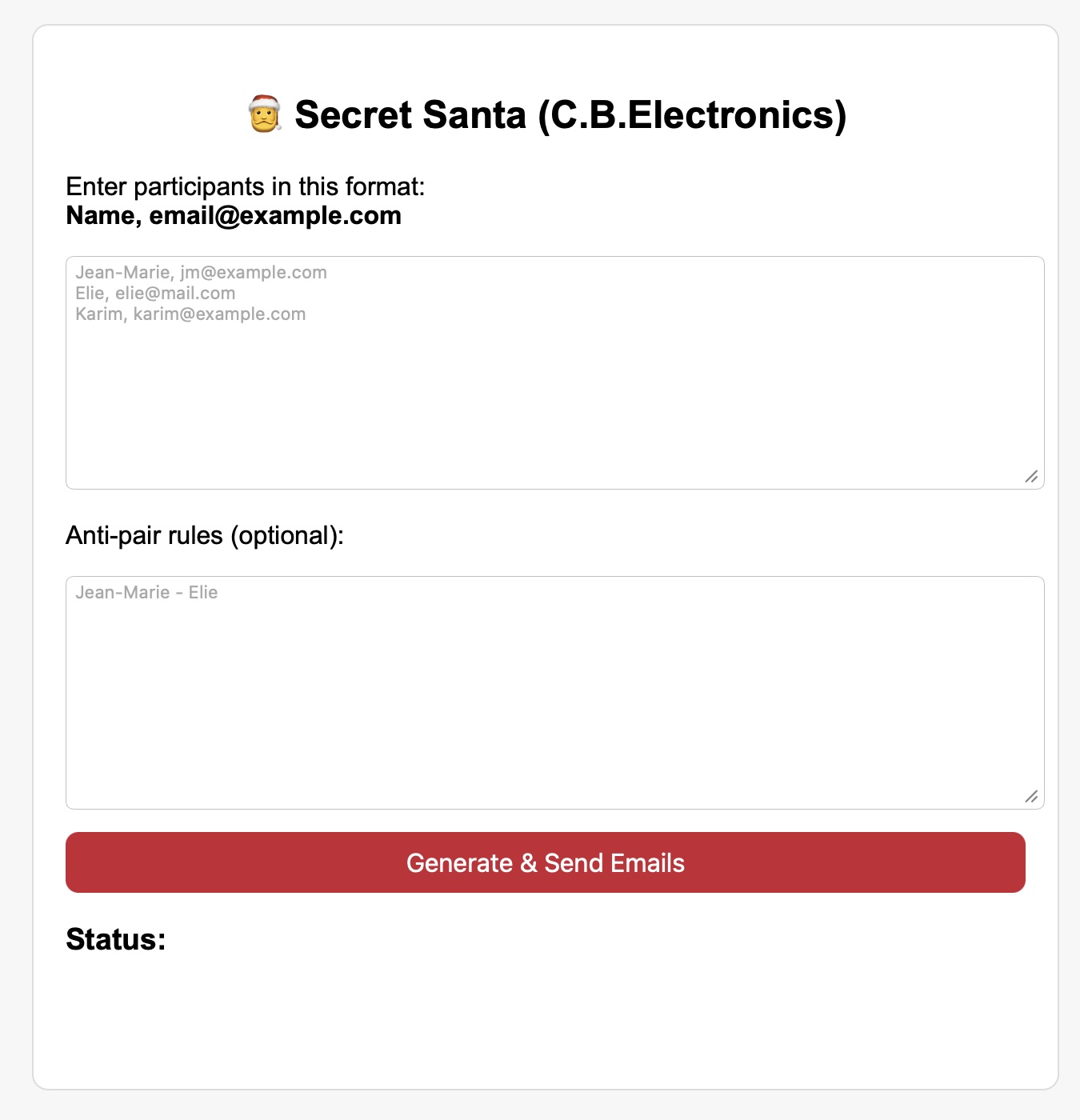
What you’ll build
A small local web app with:
- Frontend:
index.html(HTML + CSS + JavaScript) - Backend:
server.py(Python Flask) - Email: Gmail SMTP using an App Password
Everything runs on your PC/Laptop at http://127.0.0.1:5000.
Step 1: Create a project folder
Create a folder anywhere, for example on Desktop:
SecretSantaLocal/

Inside it, you will create:index.htmlserver.py
Step 2: Create a Gmail App Password (required)
Gmail will reject normal passwords for SMTP (that’s why you might see the 535 error).
- Enable 2-Step Verification on your Google account.
- Go to App Passwords and create one for “Mail”:
- Google Account → Security → App passwords
- Create: “SecretSanta”
- Copy the 16-character App Password (you’ll paste it into
server.py).
Step 3: Install the need package
Make sure you have the latest Python version:
On your terminal, type: python3 –version (Any version above or equal to 3.10 is good).
Install Flask: pip3 install flask flask-cors
Step 4: Create the frontend index.html
<!DOCTYPE html>
<html lang="en">
<head>
<meta charset="UTF-8" />
<meta name="viewport" content="width=device-width, initial-scale=1" />
<title>Secret Santa (Local + Email)</title>
<style>
  body { font-family: Arial, sans-serif; background:#f7f7f7; padding:20px; }
  #box { max-width:700px; margin:auto; padding:20px; background:#fff; border-radius:12px; border:1px solid #ddd; }
  textarea { width:100%; min-height:160px; padding:10px; }
  button { width:100%; padding:12px; background:#c82333; color:#fff; border:none; font-size:16px; border-radius:10px; margin-top:12px; cursor:pointer; }
  button:hover { opacity:0.95; }
  pre { background:#fafafa; border:1px solid #eee; padding:12px; border-radius:10px; overflow:auto; }
  .hint { color:#555; font-size:14px; }
  code { background:#f1f1f1; padding:2px 6px; border-radius:6px; }
</style>
</head>
<body>

<div id="box">
  <h2>🎅 Secret Santa (Local + Private Emails)</h2>

  <p class="hint">
    Participants format: <code>Name, email@example.com</code> (one per line)
  </p>
  <textarea id="people" placeholder="Jean-Marie, jm@example.com
Elie, elie@example.com
Karim, karim@example.com"></textarea>

  <p class="hint">
    Anti-pair rules (optional): <code>Name1 - Name2</code> (one per line)
  </p>
  <textarea id="rules" placeholder="Jean-Marie - Elie"></textarea>

  <button id="runBtn">Generate & Send Emails</button>

  <h3>Status</h3>
  <pre id="status">Ready.</pre>
</div>

<script>
document.getElementById("runBtn").addEventListener("click", async () => {
  const status = document.getElementById("status");
  status.textContent = "⏳ Working... (pairs will NOT be shown here)";

  const payload = {
    participants_text: document.getElementById("people").value,
    rules_text: document.getElementById("rules").value
  };

  try {
    const res = await fetch("http://127.0.0.1:5000/run", {
      method: "POST",
      headers: { "Content-Type": "application/json" },
      body: JSON.stringify(payload)
    });

    const text = await res.text();
    status.textContent = text;
  } catch (err) {
    status.textContent = "❌ Cannot reach the local server. Make sure server.py is running.\n\n" + err;
  }
});
</script>

</body>
</html>
Step 5: Create the backend server.py
from __future__ import annotations

from flask import Flask, request
from flask_cors import CORS
import random
import ssl
import smtplib
from email.mime.multipart import MIMEMultipart
from email.mime.text import MIMEText


app = Flask(__name__)
CORS(app)

GMAIL_USER = "YOUR_GMAIL@gmail.com"
GMAIL_APP_PASSWORD = "YOUR_16_CHAR_APP_PASSWORD"  # App Password (NOT your normal password)

def parse_participants(text: str) -> list[tuple[str, str]]:
    people: list[tuple[str, str]] = []
    for line in text.splitlines():
        line = line.strip()
        if not line:
            continue
        parts = [p.strip() for p in line.split(",")]
        if len(parts) != 2:
            continue
        name, email = parts
        if name and email and "@" in email:
            people.append((name, email))
    return people


def parse_rules(text: str) -> set[tuple[str, str]]:
    rules: set[tuple[str, str]] = set()
    for line in text.splitlines():
        line = line.strip()
        if not line or "-" not in line:
            continue
        a, b = [x.strip().lower() for x in line.split("-", 1)]
        if a and b:
            rules.add((a, b))
            rules.add((b, a))
    return rules


def violates(giver_name: str, receiver_name: str, rules: set[tuple[str, str]]) -> bool:
    return (giver_name.lower(), receiver_name.lower()) in rules


def generate_matches(people: list[tuple[str, str]], rules: set[tuple[str, str]]) -> list[tuple[str, str, str]]:
    givers = people[:]
    receivers = people[:]

    for _ in range(800):
        random.shuffle(receivers)
        ok = True
        for i in range(len(givers)):
            giver_name = givers[i][0]
            receiver_name = receivers[i][0]
            if giver_name == receiver_name:
                ok = False
                break
            if violates(giver_name, receiver_name, rules):
                ok = False
                break
        if ok:
            return [(g[0], g[1], receivers[i][0]) for i, g in enumerate(givers)]

    raise ValueError("Could not generate valid matches with the given anti-pair rules.")


def send_email(to_email: str, giver_name: str, receiver_name: str) -> None:
    subject = "Your Secret Santa Assignment 🎅"
    text_body = (
        f"Hello {giver_name},\n\n"
        f"Your Secret Santa assignment is:\n"
        f"🎁 You will give a gift to: {receiver_name}\n\n"
        "Please keep it secret 😉\n"
        "Merry Christmas! 🎄"
    )

    html_body = f"""
    <html>
      <body style="font-family: Arial, sans-serif; background:#f7f7f7; padding:20px;">
        <div style="max-width:600px;margin:auto;background:#ffffff;border-radius:12px;padding:20px;border:1px solid #eee;">
          <h2 style="text-align:center;color:#c82333;">🎄 Secret Santa 🎄</h2>
          <p>Hello <b>{giver_name}</b>,</p>
          <p>Your Secret Santa assignment is:</p>
          <p style="font-size:18px;text-align:center;">🎁 <b>{receiver_name}</b> 🎁</p>
          <p style="color:#555;">Please keep it secret 😉</p>
          <hr style="margin:20px 0;">
          <p style="font-size:12px;color:#999;text-align:center;">Sent automatically by the local Secret Santa app.</p>
        </div>
      </body>
    </html>
    """

    msg = MIMEMultipart("alternative")
    msg["From"] = GMAIL_USER
    msg["To"] = to_email
    msg["Subject"] = subject
    msg.attach(MIMEText(text_body, "plain", "utf-8"))
    msg.attach(MIMEText(html_body, "html", "utf-8"))

    context = ssl.create_default_context()
    with smtplib.SMTP("smtp.gmail.com", 587) as server:
        server.ehlo()
        server.starttls(context=context)
        server.ehlo()
        server.login(GMAIL_USER, GMAIL_APP_PASSWORD)
        server.sendmail(GMAIL_USER, to_email, msg.as_string())


@app.post("/run")
def run():
    data = request.get_json(silent=True) or {}
    participants_text = data.get("participants_text", "")
    rules_text = data.get("rules_text", "")

    people = parse_participants(participants_text)
    if len(people) < 2:
        return "❌ Please enter at least 2 valid participants in the format: Name, email@example.com", 400

    rules = parse_rules(rules_text)

    try:
        matches = generate_matches(people, rules)
    except ValueError as e:
        return f"❌ {e}", 400

    sent = 0
    try:
        for giver_name, giver_email, receiver_name in matches:
            send_email(giver_email, giver_name, receiver_name)
            sent += 1
    except smtplib.SMTPAuthenticationError:
        return (
            "❌ Gmail authentication failed.\n"
            "Make sure you used a Gmail *App Password* (not your normal password) and that 2-Step Verification is enabled."
        ), 500
    except Exception as e:
        return f"❌ Failed while sending emails.\n{type(e).__name__}: {e}", 500
    finally:
        del matches

    return f"✅ Done! Emails sent privately to {sent} participants.\n(No pairs were displayed or stored.)", 200


if __name__ == "__main__":
    app.run(host="127.0.0.1", port=5000, debug=False)
Step 6: Run the server
In the terminal (Inside the folder where you created your project) run: python3 server.py
Now you can visit the aoo by double clicking index.html